
On this page
SoftOrbits Picture Doctor Giveaway
SoftOrbits Picture Doctor
Photo repair software restores corrupted and truncated JPEG and PSD files!
- Product
- SoftOrbits Picture Doctor
- Product website
- softorbits.net
- License
- Lifetime
- Platform
- Windows 11/10/8.1/8/7
- Installer
- pdsetup.exe
- Usage
- Non-commercial only
- Updates
- No future upgrades
- Support
- No support
- Updated
- 2026-07-20
Continue on softorbits.net
Share to reveal your license code and the official claim page.
The limited-time giveaway!
The free license is no longer available.
How to get the Get SoftOrbits Picture Doctor Key Free?
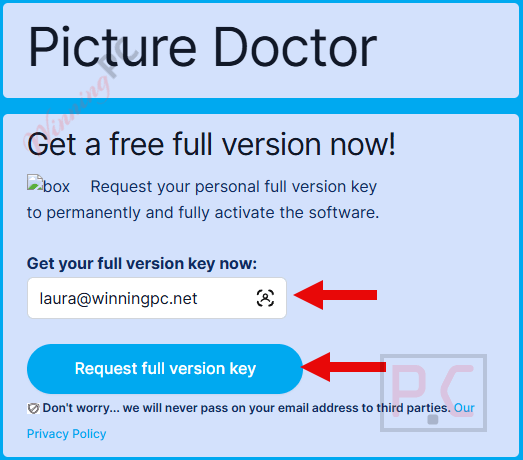
- Visit the SoftOrbits Picture Doctor giveaway page, you’ll land on SoftOrbits’ official registration form.
- Enter your name and email and submit the form to receive your free license code.
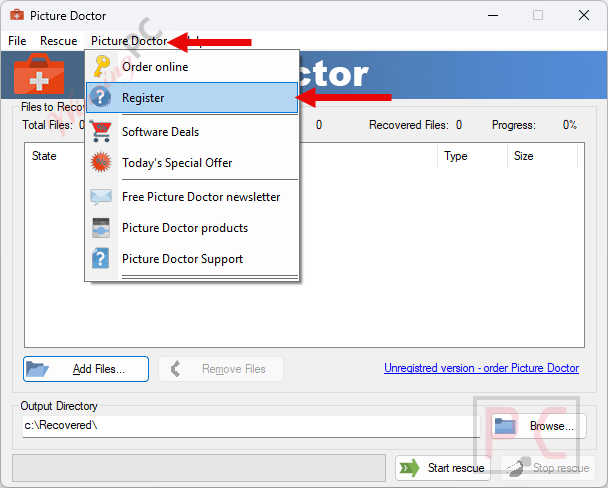
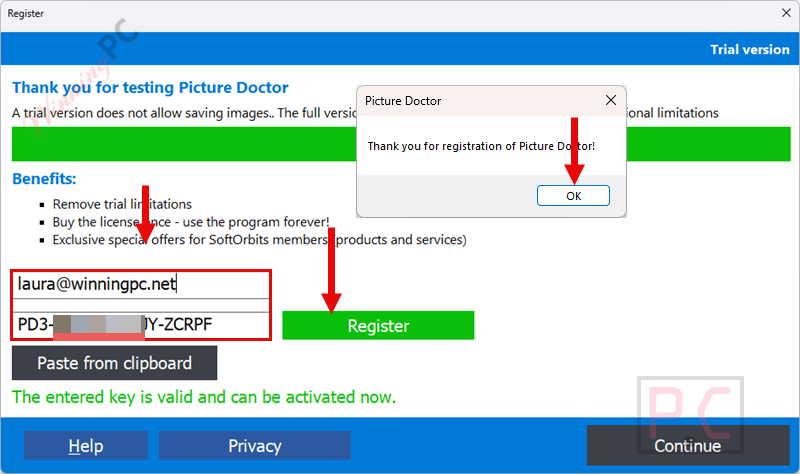
- Download, install, and open the program, then paste your license code when prompted to activate.
- Got it for a lifetime free with full function!


Top Photo Recovery Software Coupon Codes October 2026

Minitool Photo Recovery Personal Standard
Single license for 1 PC | 1-Year upgrade

iMobie PhoneRescue for iOS (Windows)
Plan for Lifetime | Lifetime Free Upgrades

Tenorshare UltData for iOS - Lifetime/1-5 Devices
Free upgrades and technical support

EaseUS MobiSaver for Windows
Up to 5 iOS devices | Lifetime free upgrades

Hands-on with SoftOrbits Picture Doctor
SoftOrbits Picture Doctor does one thing and doesn’t try to do more: it fixes JPEG and PSD files that won’t open. Feed it a folder of broken files, click Start Rescue, and it works through the pile automatically. The success rate is honest: about half of badly damaged files come back viewable, depending on how many sectors were lost. When a photo returns with a gray or green block, those pixels are physically gone, and no repair tool can conjure them back. That’s not a flaw, it’s just physics. What SoftOrbits Picture Doctor does unusually well compared to most JPEG repair tools is PSD layer recovery: it can rebuild editable PSD layers rather than collapsing everything into a flat background, which matters enormously if the file is a retouch project.

Key features
- JPEG & PSD repair: fixes broken SOI markers, scrambled headers, and truncated file data; supports JPEG (EXIF, JFIF) and PSD (Photoshop 3 through CC and later, including versions 22–26)
- PSD layer recovery: restores editable layers instead of collapsing them to a single background; rare among repair tools
- Batch mode: point it at a folder, and it processes the entire pile in one pass
- Preserves original dimensions and EXIF: a 6000 × 4000 frame stays 6000 × 4000 with its capture date intact
Pros & Cons
more screenshots!


Common questions about SoftOrbits Picture Doctor
Can SoftOrbits Picture Doctor repair all corrupted JPEG files?
Not every file. About 50% of badly damaged JPEGs come back viewable: the result depends on how many sectors were lost. If the damage is light (truncated transfer, bad header), recovery is likely. If large portions of the image data are gone, the tool rebuilds what it can but can’t invent missing pixels.
Does the giveaway license really last forever?
Yes, the giveaway grants a Lifetime license. You activate it once and it doesn’t expire. The trade-offs are no future upgrades and no tech support – both standard for giveaway licenses.
Does SoftOrbits Picture Doctor recover deleted photos?
No. Repair and recovery are different tools for different problems. If a file was deleted, use a recovery tool (PhotoRec, Recuva, or a commercial option) first to bring the file back, then run Picture Doctor on any files that came back broken.
Can it restore PSD layers, or does it just flatten everything?
SoftOrbits Picture Doctor restores layers. That’s one of the things that makes it stand out: most repair tools collapse a damaged PSD to a single flat background. Picture Doctor reads the layer structure and attempts to bring each layer back as editable. Heavy or complex layer stacks don’t always survive in full, but simpler files usually come through cleanly.
What formats does Picture Doctor output?
Repaired files are saved as BMP. You’ll need to open them in any image editor (even Paint) and export to JPEG, PNG, or whatever format you need. It’s a minor extra step, but it’s worth knowing upfront.
My photo was repaired but still has a gray block — what happened?
The gray or green block means that section of pixel data was physically lost, likely to bad sectors on the storage device. SoftOrbits Picture Doctor fixed the file structure so it opens, but it can’t reconstruct data that wasn’t there. SoftOrbits’ own Photo Retoucher can paint over the damage manually if you need a presentable result.
System Requirements & Details
| Operating system | Windows 11 / 10 / 8.1 / 8 / 7 (32-bit & 64-bit) |
| Processor | Intel i3, AMD Ryzen 5 or above |
| RAM | 4 GB or above |
| Graphics | NVIDIA GeForce 8-series or later · Intel HD Graphics 2000 · AMD Radeon R600 or later (up-to-date drivers required) |
| Display | 1280 × 768, 32-bit color |
| Disk space | 1 GB free or above |
| Supported input formats | JPEG / JPG (EXIF, JFIF), PSD (Adobe Photoshop 3, 4, 5, 6, 7, CS–CS6, CC, versions 22–26) |
| Supported output format | BMP |





It functions under Vista and registration does NOT need an email address, just pasting in the key and registering is sufficient. If you want to put this onto a drive other than C: userappdata the hard coded default install location of softorbits programs use innoextractor to extract the installer contents and manually move the extracted contents to where you want/need them to be and create shortcuts as necessary. I cannot test it to see how well it repairs broken JPG or PSD files as I don’t have any broken ones oddly enough but if that rare occurrence happens I’ll give it a try.